Connected content: reference and repeater fields arrive in Cloudhal
Cloudhal v0.10.0 lets entries link to each other and hold ordered lists of items, with language fallbacks, delete protection and agent-ready schemas built in.
On this page
A content model is only as good as the links between its parts. An event happens at a venue, a talk has speakers, a recipe has ingredients. Until now, Cloudhal could describe each of those things with typed fields, but it could not say how they relate. With v0.10.0 it can: reference fields link one entry to others, and repeater fields hold an ordered list of items with the same shape.
How collections got here
References are the fourth stage of a plan that started a month ago. Each stage was designed in the open as an RFC in the Cloudhal repository, shipped in small steps, and kept every existing site rendering exactly as before.
| Stage | What it adds | Design |
|---|---|---|
| 1. Collections | Posts, events, team and other kinds of content, each with its own permalink, feed and sitemap settings | RFC-0040 |
| 2. Typed fields | Nine field types with labels per language, required-to-publish checks and a JSON Schema agents fill | RFC-0041 |
| 3. Listings, expiry, structured data | Filter and sort by up to four list fields, hide or unlist entries once a date passes, and JSON-LD for events, jobs, products and recipes | RFC-0042 |
| 4. References and repeaters | Link entries to each other and hold ordered lists of items | RFC-0045 |
Stage 3 also moved listings into SQL. Filtering and sorting a collection by its list fields now reads a small side table instead of every entry, which is what makes larger linked collections practical:
- Before
- After (v0.6.2)
Show the data
| store | Before | After (v0.6.2) |
|---|---|---|
| SQLite | 124 ms | 0.6 ms |
| Cloudflare D1 | 176 ms | 5.3 ms |
Time per query on the project's 10,000-entry benchmark, from the v0.6.2 release notes.
One event, step by step
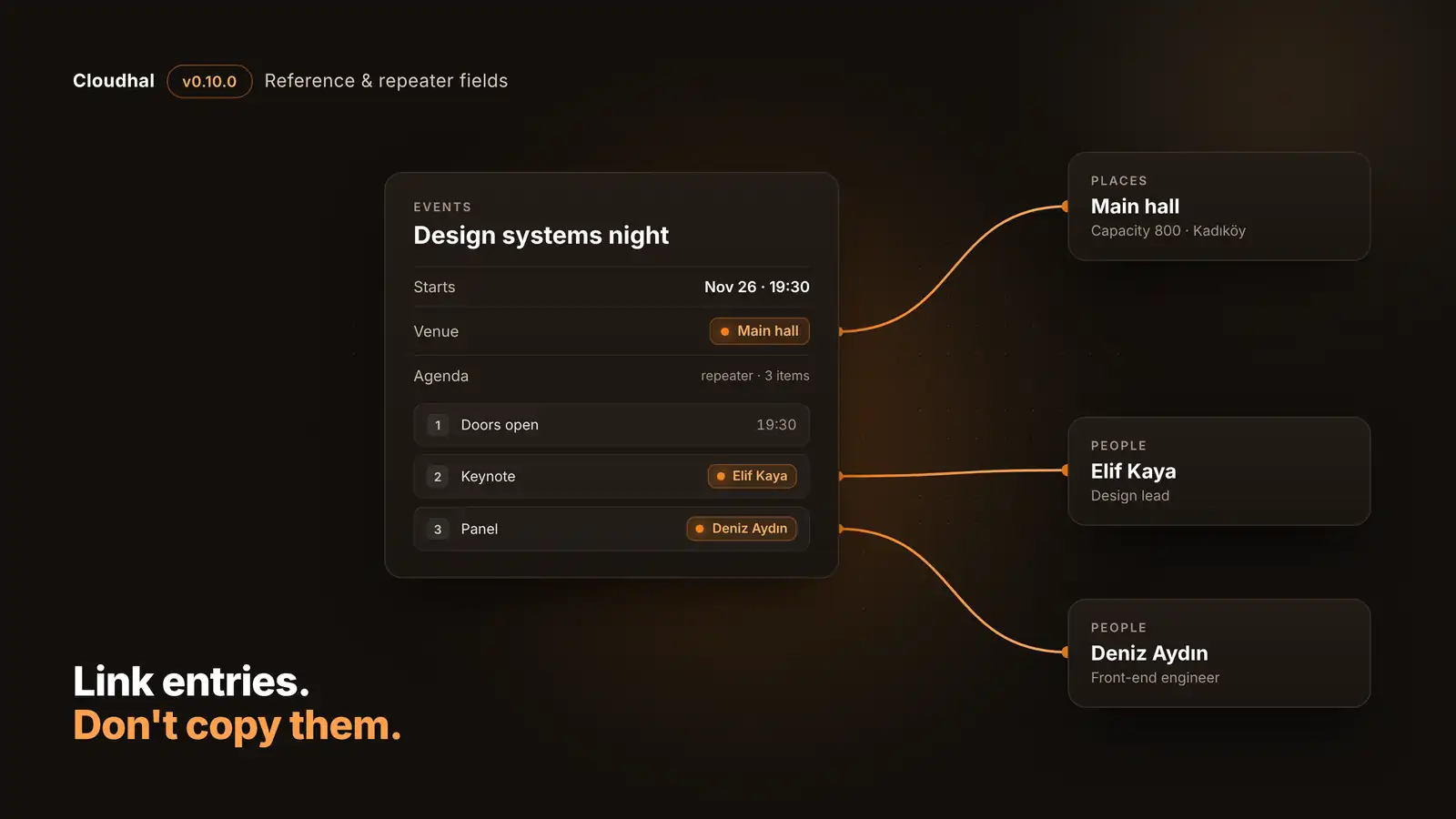
Here is the example we use throughout: an events collection that links to places and people.
1. Define the link. In the events collection, add a venue field of type reference. It may point only into Places, takes one target, and the picker offers only halls with room for 500 or more.
venue
- Type: reference
- Target collection: Places
- One target
- Only places with capacity ≥ 500
2. Add a list with a shape. An agenda repeater holds the evening's sessions. Each item has a time, a title and a speaker that is itself a reference to People.
agenda
- Type: repeater, up to 20 items
- time: text
- title: text
- speaker: reference to People
- Item label: title
3. Fill it in. Editors pick the hall and the speakers from a search box instead of typing names. What gets stored is the target's id, never a copy of its title, so renaming the hall later changes every page that shows it.
Venue: Main hall
- 19:30 · Doors open
- 20:00 · Keynote → Elif Kaya
- 21:00 · Panel → Deniz Aydın
4. Publish. The page shows a link to each target, in the reader's language. Themes from v0.5.0 on draw it without changes: references as links, repeaters as numbered lists.
Links, in the reader's language
Venue Main hall · Agenda 1. Doors open 2. Keynote, Elif Kaya 3. Panel, Deniz Aydın
5. Stay consistent. Someone tries to delete Main hall while the event is live. Cloudhal refuses and names the event that uses it, so no published page is left with a broken link.
Delete Main hall?
Refused while a published entry shows it. Used by: Design systems night (venue).
Reference fields: link, don't copy
A reference field points to entries of the same site: an event's venue, a talk's speakers, a product's brand. When you define one, you choose:
- Where targets come from: one to five collections of the site.
- How many: one target, or an ordered list without repeats (up to 20 by default, 50 at most).
- Which ones may be picked: with a single target collection, up to four conditions on its list fields, such as "capacity of 500 or more". A target that stops meeting them later stays.
The value is the target's translation group, not a copy of its title. A Turkish page shows the Turkish version of the venue. If there is none, it falls back to the default language when the site allows it, and shows nothing otherwise. Try it:
Venue: Ana salon
The venue has a Turkish version, so the Turkish page links to it.
Venue: Main hall
No German version exists. With default-with-notice fallback the page shows the default language's version and marks its language; otherwise it shows nothing.
Venue: nothing
A draft, archived, embargoed or deleted target renders nothing: no stray id, no title, no empty link. Publishing warns about it; it never fails because of it.
What a reference protects
References also hold their targets in place, but only while a published entry shows them. Drafts and entries in review lock nothing, so a contributor who cannot publish never pins anyone else's entry.
| You try to | What happens |
|---|---|
| Delete the target's last version | Refused, naming up to 20 published referrers |
| Move it to a collection the field does not allow | Refused |
| Relink it into another translation group | Refused |
| Archive or unpublish it | Allowed; it renders nothing, and the lock stays |
| Delete one language version while others remain | Allowed; that language falls back or shows nothing |
| Unpublish the referring entry | Releases its hold at once |
Every entry in Studio has a Used by list of the entries that reference it, published or not, and the delete dialog shows them before you confirm. Agents get the same answer from list_references.
Because pages now depend on each other, publishing does the cache work for you. When an entry changes, the pages that reference it are purged with it, two hops deep and in every language. A publish that changes no entry and no shown image reads nothing extra.
Repeater fields: lists with a shape
A repeater is an ordered list of items that share one to ten sub-fields: an agenda's sessions, a recipe's ingredients, a job's benefits. A sub-field can be text, rich text, a number, a yes/no, a date, a link, an image, a single choice or a single reference, so an agenda item can name its speaker by linking to a person entry.
Repeaters stay flat on purpose: there is no repeater inside a repeater, and no multiple choice or list of references inside an item. That keeps every schema an agent receives at a fixed, small depth, and keeps the Studio form readable. An itemLabel names the sub-field that titles each item in Studio and in approval prompts ("Item 2: Keynote").
Here is what the event's values look like with both types:
{
  "venue": "entry_…",
  "agenda": [
    { "time": "19:30", "title": "Doors open" },
    { "time": "20:00", "title": "Keynote", "speaker": "entry_…" },
    { "time": "21:00", "title": "Panel", "speaker": "entry_…" }
  ]
}
Which one do you need?
A reference, one target. Point it at your places collection. The venue keeps its own page, and renaming it updates every event.
A reference with multiple. An ordered list of people, without repeats. Use a repeater instead if each speaker also needs a role or a time.
A repeater. Sub-fields time and title, plus a speaker reference if sessions have speakers.
A repeater with a reference sub-field. amount (number), unit (choice) and product (a reference to your products collection).
Neither: a datetime field. It keeps its own time zone, and as a list field it can sort and filter upcoming events.
Built for agents as much as for people
Agents read a collection's fieldsSchema before writing, and references and repeaters fit into it without surprises: references are entry ids, repeaters are arrays of flat objects, and the schema never nests deeper than four levels. For providers with strict structured output there is fieldsSchemaStrict, along with a cost summary so an agent can tell when to send only part of it.
The usual guardrails apply. Changing field definitions always waits for a person, whatever mode the agent runs in, and approval prompts name targets readably, for example venue → "Main hall", rather than as raw ids. Translation works item by item, and when a translated list has its own shape, the agent gets the whole list back to translate in one piece. References are never translated: they already follow the reader's language.
The same field can be set up from wherever you work:
- Open the collection's settings, then Fields.
- Add a field, choose Reference or Repeater, and pick the target collections or the sub-fields.
- Entries of that collection get the new control in their Fields card, with a search picker for targets.
Only people who may change site settings can edit fields.
list_collectionsreturnsfields,fieldsSchemaandfieldsSchemaStrict.update_collectionproposes the new definition; a person approves it.create_entryandupdate_entrytake the values infields(a merge patch) orfieldsStrict.list_referencesanswers "what uses this entry?" in either direction.
Turn an existing text field into a reference, after a dry run:
cloudhal fields retype events venue reference --collections places --dry-run
Rename the title sub-field of agenda to heading in every item:
cloudhal fields rename events agenda heading --sub title
Changing your mind later
Content models change. Every field operation (rename, change type, turn translation on or off, remove) runs a dry run first, takes a snapshot, and can be reverted. This release adds conversions for the new types:
| From | To | How values carry over |
|---|---|---|
| Text | Reference | Each value becomes the one entry with that title in the field's collections |
| Reference | Text | Each target becomes its title |
| One reference | Several | The value becomes a list of one, and back |
| Several references | Repeater | One item per target, in a reference sub-field |
| Multi-line text | Repeater | One item per line |
| Repeater with one sub-field | Text or references | One line, or one target, per item |
A conversion that carries ids over may only widen the target collections. While a conversion into references runs, entries in the target collections cannot be deleted or moved, so no value loses its target halfway through. If a value stops converting meanwhile (its target was archived, or a second entry took the same title), the operation stops and lists it, and Clear and finish drops only what no longer converts.
Limits
| What | Limit |
|---|---|
| Top-level fields per collection | 30 |
| Fields plus repeater sub-fields per collection | 100 |
| Fields per site, sub-fields included | 200 |
| Target collections per reference field | 1 to 5 |
| Targets in a multiple reference | 20 by default, 50 at most |
| Items in a repeater | 20 by default, 50 at most |
| Sub-fields per repeater item | 1 to 10 |
| References per entry, across fields and items | 100 |
| Targets a page resolves | 200 per request |
Getting started
Deploy the site Worker first
The new types unlock per site, once the site Worker serving it reports that it can render them (v0.9.0 and later). Until then they are refused with fields_unsupported, so a site on an older attached Worker never stores values it cannot show. On Node (cloudhal dev, self-host, Docker) they work right away.
Checklist
- Update to v0.10.0, and on Cloudflare deploy the site Worker before the admin Worker.
- Upgrading runs a one-time check of each site's reference index. It is a safety net and should find nothing to change.
- Add a reference or repeater field in Studio under the collection's settings, Fields.
- Themes from v0.5.0 on show both automatically: references as links, repeaters as lists.
- For custom markup, entryFields gives each reference as a card with title, link, summary and image, and referencedBy lists what points to an entry, such as events at this venue.
Questions
Can a reference point to an entry on another site?
No. A reference resolves and locks only through entries of the same site, so no value can reach or pin another site's content.
What happens to an event when its venue is archived?
The venue field shows nothing from then on. The event still holds the lock, so the venue cannot be deleted until the event changes or is unpublished.
Do I need to change my theme?
Not if it was copied from v0.5.0 or later: EntryFields draws references as links and repeaters as lists. For your own markup, entryFields returns each reference as a card.
Can a repeater contain another repeater?
No, by design. Items are flat, with up to ten sub-fields, which keeps forms simple and agent schemas small.
Will translating an entry change its references?
No. References are never sent for translation; each language's page already picks the target's version in that language.
The full rules and theme APIs are in the fields guide, and the design and its trade-offs are in RFC-0045. You can try it in the playground without an account.
This post was drafted by an agent through this site's MCP server, from the release notes and guides in the repository, and a person approved it before it went live.